
Subscription Manager - ReSubs
Christian KruegerFinance
3.639.00 Reviews
- Version
- 1.37.0
- Installs
- 50.00K
- Age Rating
- Everyone
Screenshots
Our Review of Subscription Manager - ReSubs
 Analysis by Appyee
Subscription spending gets harder to follow when several people in a household use different services, renewals land on different days, and nobody is quite sure who signed up. I find Subscription Manager - ReSubs most useful as a deliberate record of those recurring costs: it can help turn “I think we still pay for that” into a list the household can review together. It is a finance app by Christian Krueger, and its appeal is less about replacing a bank account or cancelling services automatically than about making recurring commitments easier to see and discuss.
A shared household bill, without shared account access
Imagine a monthly check-in after a streaming renewal catches your eye. One person uses the service, another remembers starting a trial, and a third is unsure whether the charge is still active. A subscription tracker can give everyone a common reference point, but the practical value depends on entering and maintaining the details. I would treat ReSubs as a household ledger, not as a live view of every family member’s billing accounts.
That distinction matters for shared devices. If several people can open the same phone or tablet, the entries are only useful if everyone understands whose subscriptions they represent. I’d agree on a simple convention before adding anything: record the payer or user in the service name or notes if the app’s available fields allow it, and keep a separate mental distinction between household costs and personal ones. Don’t assume the app provides separate profiles or family permissions.
Decide what belongs in the list before entering it
Setup is straightforward, but a little preparation makes the overview more trustworthy. I’d check recent bank or card statements and add recurring services one at a time, rather than trying to remember everything in a rush. For each entry, confirm the amount and billing interval against the actual charge. A remembered monthly price can be misleading when a plan is billed annually or when a promotional period has ended.
This is also a useful place to record a trial’s decision date, not merely its next payment date. A reminder only helps if it arrives early enough for you to make a choice and complete the cancellation through the provider. I’d set the alert with time for that extra step, especially for services that require signing in, locating account settings, or asking another household member whether they still use the plan.
Coordination works best with a clear owner
ReSubs can support a household conversation, but it cannot make an unclear arrangement clear by itself. Before cancelling anything, I’d confirm who pays, who uses the service, and whether the account is tied to a particular person’s email or device. That small check can prevent an awkward surprise when someone loses access to a service they still rely on.
For couples or housemates, a shared review can be more useful than passing around a phone. One person can read the recurring charges while the other checks which services are genuinely being used. If the app is installed on a device that others can access, remember that a visible subscription list may reveal personal spending choices. I would keep private subscriptions on a personal device rather than treating a shared screen as automatically private.
Trust, age, and the limits of a manual tracker
The app is rated for Everyone, but a household should still decide whether a child needs to see its financial overview. An age rating is not a substitute for supervision or a promise of household controls. I would avoid handing a child responsibility for editing the list unless they understand that the entries describe real recurring charges and that cancelling a record in a tracker is not the same as cancelling the underlying service.
That is the key trust boundary: the app helps organize information you enter, while the provider remains responsible for billing and cancellation. Treat reminders as prompts to act, not confirmation that a renewal has been stopped. This is a sensible arrangement for people who prefer not to connect financial accounts, but it also means the list can become outdated if nobody checks it against real charges.
ReSubs is free to install, with in-app purchases ranging from $3.99 to $44.99 per item. It has a 4.0 average from around 700 ratings and more than 10,000 installs. The app is for Everyone, and its current version is 1.27.0; it runs on Android 8.0 or later. Those details make it easy to try, though I’d look at the purchase options in the app before deciding whether any paid feature is relevant to my routine.
Getting Started with ReSubs
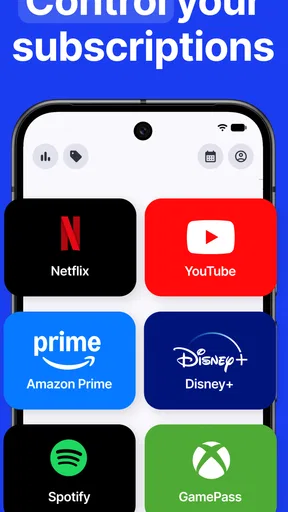
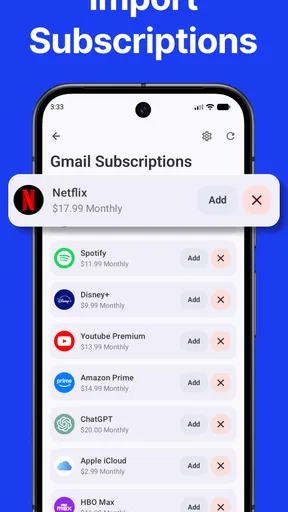
Setting up ReSubs is a walk in the park. Once you've downloaded the app, you're greeted with a clean, minimalistic interface that doesn’t overwhelm you with too many options. The app asks you to start adding your subscriptions, and it's as simple as tapping a button and filling in the details. You can input the service name, billing cycle, and cost. It even lets you set reminders for upcoming payments, so no more nasty surprises!
Tracking Your Subscriptions
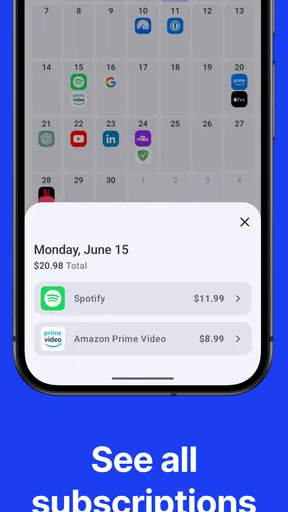
We all know how subscriptions can sneak up on us, especially those "free trials" that morph into monthly charges. With ReSubs, you can keep everything in check. The dashboard provides a neat overview of your spending habits, showing you exactly how much you're shelling out each month. It's like having a personal accountant in your pocket, minus the judgmental stares.
One feature I really appreciated is the ability to categorize subscriptions. You can group them into categories like Entertainment, Utilities, or Business, making it easy to see where most of your money is going. It’s an eye-opener, especially if you're trying to trim down unnecessary expenses.
Reminders and Notifications
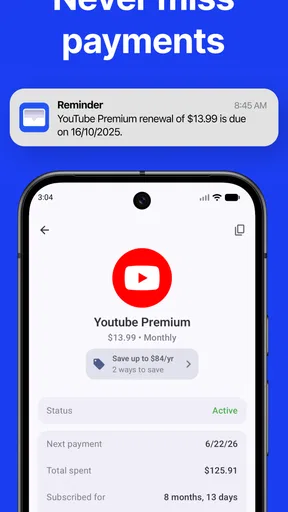
Raise your hand if you've ever forgotten to cancel a subscription and ended up paying for another month. Yeah, guilty as charged. But with ReSubs, you can set reminders before your subscription renews. You get notified in advance, giving you ample time to decide whether to keep or cancel the service. Peace of mind? Check!
Notifications are customizable, so you can choose how early you want to be alerted. Whether you want a week's notice or just a day, ReSubs has got you covered.
Insights and Budgeting
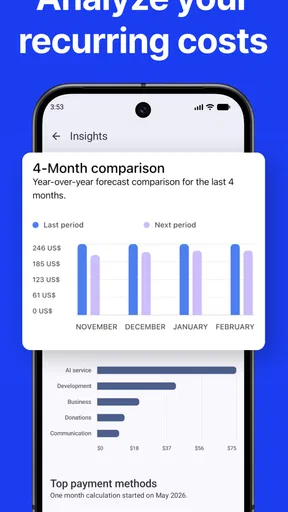
Another cool feature is the insights section. Here, the app provides a breakdown of your spending patterns, complete with graphs and charts. It's like having a budgeting app rolled into your subscription manager. You can see trends over time, helping you identify which subscriptions are worth keeping and which ones are burning a hole in your pocket.
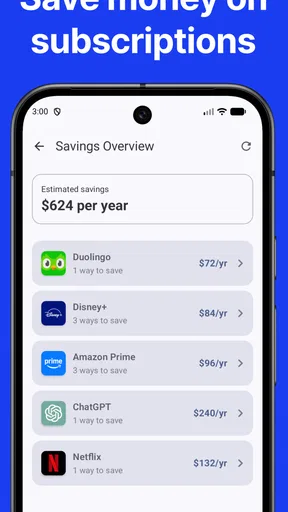
The app also offers suggestions on how to optimize your subscription usage based on your spending habits. It's a nifty way to ensure you're getting the most bang for your buck.
Security and Privacy
In this day and age, security is a big deal, and ReSubs seems to take it seriously. All your data is kept secure and private, with no third-party sharing. It’s comforting to know that your financial information isn’t floating around the internet for anyone to grab.
Plus, the app doesn’t require you to link your bank accounts or credit cards, which is a relief for those of us who are a bit wary about sharing financial details.
Where a dedicated tracker fits among the alternatives
For a small number of subscriptions, a calendar reminder or a note on your phone may be enough. Those options are quick and familiar, but they do not give the same purpose-built view of costs and categories. A full budgeting app can put subscriptions beside other spending, which is better if you want a complete household budget; ReSubs is the narrower tool I’d choose when recurring services are the problem I’m trying to untangle.
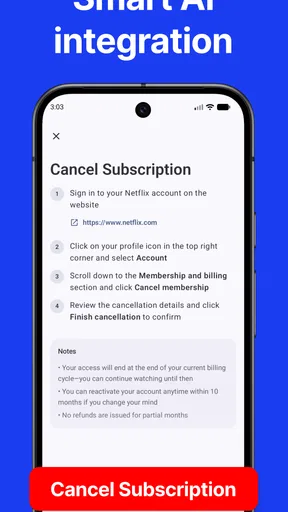
That narrower focus is both its strength and its limitation. You have to enter and maintain the entries yourself, so it is not the right pick if you expect automatic detection of forgotten charges or one-tap cancellation. The description emphasizes tracking, management, and cancellation, but I would still expect to visit each provider’s own account page to end a plan and verify that it has stopped. Keep the app’s record as your checklist, not as proof of a completed cancellation.
Small habits that make the overview more useful
One practical approach is to add subscriptions in two passes. First, record only the services you can verify from a statement or provider account. Then, during a later review, add the less obvious recurring items you spot in receipts or app-store purchase history. This reduces the chance of putting an uncertain amount into the dashboard and mistaking a guess for a reliable monthly total.
Categories can also help you make a decision rather than merely admire a chart. I’d separate services by purpose—such as entertainment, work, or household utilities—then ask whether each one has a current user and a clear reason to keep it. If two services serve the same need, compare how often the household uses each before cancelling; the cheapest line item is not automatically the best one to keep.
When a charge changes, update the entry promptly. Otherwise, an overview that once helped can quietly become a source of bad decisions. I’d also review annual renewals before they come due, because a monthly-style glance can make a large occasional payment easy to overlook. A reminder set well ahead of the renewal is more useful than one that appears on the day the bill is due.
Who will get the most from it—and who may not
I’d recommend ReSubs to someone who has several recurring services, wants to see them grouped in one place, and is willing to keep the list current. It is especially handy for a person who manages household bills but does not want to hand an app direct access to bank or card accounts. The manual approach asks for a little discipline in exchange for a more focused view of subscriptions.
I’d skip it if you only have one or two predictable charges, already track them reliably in a calendar, or need transactions imported automatically. It may also frustrate anyone who expects the app to negotiate cancellations, detect every forgotten payment, or synchronize separate household members’ records without extra effort. In those situations, a bank’s recurring-payment tools, a general budgeting app, or a shared household spreadsheet may suit the workflow better.
For iPhone users, I’d check the relevant app store for availability and device requirements before planning a shared setup; the Android version supports devices running Android 8.0 or later. Either way, the main question is not whether everyone can install it, but who will be responsible for accurate entries and who gets to see them. Agreeing on that first avoids turning a useful money check-in into an argument about privacy or ownership.
Final Thoughts
Overall, Subscription Manager - ReSubs is a gem for anyone looking to gain control over their subscriptions. It’s user-friendly, informative, and helps you save money in the long run. Whether you're a subscription hoarder or just have a few services you can't live without, this app is worth checking out. Give it a try, and watch your financial stress take a backseat!
My household verdict is positive with one condition: treat the app as a shared reference only when the people involved agree on what is being tracked and who maintains it. For a household that wants a simple inventory and reminders, that can be enough to prompt better conversations and catch services nobody remembers using. For automatic account monitoring or coordinated family access, I’d choose a tool designed specifically for those needs instead.
Verdict
Strengths of Subscription Manager - ReSubs
- User-friendly interface simplifies tracking.
- Custom reminders for upcoming renewals.
- Supports multiple currencies for global users.
- Detailed analytics on spending patterns.
- Secure data storage with encryption.
Limitations of Subscription Manager - ReSubs
- Limited free features available.
- No integration with banking apps.
- In-app ads can be intrusive.
- Occasional sync issues reported.
- No web version for desktop use.
Similar Picks in This Category
View All
Google Wallet
Google LLC4.3

Airtel: Recharge, Bank & Loans
Airtel4.0

PayPal - Pay, Send, Save
PayPal Mobile4.2

DANA Indonesia Digital Wallet
PT Espay Debit Indonesia Koe4.5

Binance: Buy Bitcoin & Crypto
Binance Inc.4.8

Cash App
Block, Inc.4.7
Frequently Asked Questions
What is Subscription Manager - ReSubs and how does it work?
Subscription Manager - ReSubs is an app designed to help users track and manage their various subscriptions. It allows you to input subscription details, such as renewal dates and costs, and sends reminders before payments are due. The app aims to prevent unexpected charges and helps you manage your finances more effectively.
Is Subscription Manager - ReSubs available for both Android and iOS?
Yes, Subscription Manager - ReSubs is available for download on both Android and iOS platforms. You can find it on the Google Play Store for Android devices and the Apple App Store for iOS devices. This ensures that users across different platforms can take advantage of its features.
Does Subscription Manager - ReSubs offer any in-app purchases or premium features?
While the basic version of Subscription Manager - ReSubs is free, it does offer in-app purchases for premium features. These may include advanced notifications, the ability to track an unlimited number of subscriptions, and enhanced reporting tools. Check the app’s page for detailed pricing and features included in the premium package.
How secure is the data entered into Subscription Manager - ReSubs?
Security is a top priority for Subscription Manager - ReSubs. The app uses encryption protocols to safeguard your data, ensuring that your subscription details and personal information remain secure. Additionally, it doesn’t store payment information directly, adding an extra layer of security.
Can I sync Subscription Manager - ReSubs across multiple devices?
Yes, Subscription Manager - ReSubs offers the ability to sync your data across multiple devices. This feature ensures that you can access your subscription information both on your smartphone and tablet. You’ll need to create an account and log in on each device to enable this synchronization.
